

Best AI Tools for Small Business in 2026
There is no single best AI tool for every small business. A sensible starting point is one tool that fits a repeated job, such as drafting, design, or workflow automation. Check current pricing, privacy terms, integrations, and plan limits before recommending a product to the team.
That alone cuts through most of the noise. Small businesses do not need a giant stack of trendy tools. They need a few tools that solve repeated problems without creating another management headache.
Most “best AI tools” lists are written for people who love software. This one is written for owners who want useful results, predictable costs, and a realistic starting point.
Key Takeaways
- Choose a tool by the problem it solves, not by the size of its feature list.
- Start with one writing, customer-response, or workflow use case.
- Include setup, training, review time, privacy, and cancellation in the cost.
- Product features and pricing change, so confirm them on the vendor’s current site.
Why Most “Best AI Tools” Lists Are Wrong for Small Businesses
The typical list makes three mistakes.
First, it treats small businesses like scaled-down enterprises. They are not. A ten-person shop does not have an internal training team, a dedicated IT manager, or spare hours to evaluate twelve overlapping subscriptions.
Second, many lists reward feature depth instead of practical value. A tool can be impressive and still be a poor fit if it takes weeks to learn.
Third, they ignore adoption. The real cost of a tool is not just the monthly price. It is the setup time, the staff time, the confusion, and the failure risk if nobody uses it.
How We Evaluated These Tools (Our Criteria)
For small businesses, we care about five things:
- Low friction to start
- Clear everyday use cases
- Affordable entry point
- Reasonable safety for normal business use
- High odds that a nontechnical team will actually keep using it
That means some powerful tools do not make the cut. We are not trying to crown the smartest platform. We are trying to identify the tools most likely to create a real return.
For Writing and Communication: ChatGPT and Claude
If you are just starting, this is the easiest category to understand. Writing tools help with emails, customer responses, FAQs, drafts, proposals, summaries, and internal communication.
ChatGPT and Claude are examples of flexible writing and communication tools. Compare their current plans, privacy controls, file handling, and team features before choosing one for business use. The best first option is the one your team can use consistently for a clearly defined task.
If your team keeps getting stuck on blank pages, slow follow-ups, or repetitive messaging, start here. For many businesses, the best first AI win is simply better communication done faster.
If you want the beginner version of that conversation, start with our guide on how to use ChatGPT for your small business.
For Customer-Facing Chatbots: Tidio, Intercom’s Fin, and Zapier Interfaces
This category is about response speed and availability.
If your website gets frequent questions about hours, pricing, service areas, or scheduling, a customer-facing assistant may help. The right setup can answer basic questions after hours, route leads faster, and reduce the back-and-forth your team handles manually.
But this category is also where businesses overbuy. A chatbot is only useful if:
- Your website already gets enough traffic
- The questions are somewhat repeatable
- Someone is ready to maintain the answers
Tidio, Intercom’s Fin, and Zapier Interfaces are examples to compare, not automatic recommendations. The right choice depends on the volume of questions, the systems it must connect to, the staff who will maintain answers, and what happens when the assistant is uncertain.
For Marketing and Social Media: Jasper, Copy.ai, and Canva AI
Marketing tools are popular because they help owners and small teams create content faster.
Canva AI is often the easiest place to start because many businesses already use Canva. It helps with design drafts, ad variations, social images, and simple copy support inside a familiar tool.
Jasper and Copy.ai are more focused on marketing copy and campaign workflows. They can be useful if your business is publishing a lot of content, but they make the most sense after you already know what kinds of messaging convert for your audience.
In other words, these tools speed up a strategy. They do not replace one.
For Scheduling and Operations: Motion, Reclaim, and Zapier
This is where time savings become tangible.
Motion and Reclaim focus more on personal and team scheduling. They help reorganize work, time blocks, and calendars when priorities shift.
Zapier is different. It is one of the most valuable small business tools because it connects systems. That means when one thing happens, like a form submission, an appointment booking, or a paid invoice, something else can happen automatically.
That is the kind of “boring” automation that creates real margin. It is closely related to the kinds of workflow improvements we described in how to measure technology ROI as a small business.
For Accounting and Finance: QuickBooks AI Features and Digits
Financial tools are becoming better at categorization, summaries, forecasting, and basic anomaly detection.
QuickBooks is already familiar to many small businesses, so its AI features may be the easiest path if you are already inside that ecosystem. Digits and similar tools aim to make financial reporting more understandable and more forward-looking.
Still, this is a category where restraint matters. Finance is too important to hand over blindly. The right use is usually assistance, not full automation.
AI can help owners understand the numbers faster. It should not be making unsupervised decisions about the numbers.
For Cybersecurity: Guardz and SMB-Focused Tools
Cybersecurity AI is less glamorous than marketing AI, but it may matter more.
Small businesses are frequent targets because attackers assume the defenses are weaker. Tools like Guardz and similar SMB-focused platforms help monitor risk, flag suspicious activity, and reduce some of the administrative burden around basic protection.
That does not mean “install a security tool and forget it.” It means good tooling can support better habits, better visibility, and faster response.
Judge a security tool by the risks it covers, the alerts a person will actually review, the accounts and devices it can see, its data handling, and the recovery process behind it. A product cannot replace strong authentication, updates, backups, and staff verification habits.
The Hidden Cost No One Mentions: Adoption and Training Time
This is the cost that kills more tool rollouts than the monthly bill does.
If a tool saves two hours per week but takes six weeks to understand, the math is not as obvious as the marketing page makes it sound. The same is true if one person on the team knows how to use it and everyone else avoids it.
The best tool for a small business is often the one that gets used consistently, not the one with the longest features list.
That is why many businesses should start with one writing tool and one automation tool, then expand only after there is a clear habit and a clear result.
A Framework for Deciding: Start Here, Not There
If you are overwhelmed, use this order:
- Start with writing and communication
- Move to one simple automation
- Improve customer response speed
- Add marketing support only if you can sustain content output
- Add specialized tools when there is a clear problem to solve
This sequence works because it mirrors the way most small businesses create value. First improve communication. Then reduce repeated work. Then scale consistency.
What to Do When You’re Overwhelmed by Options
Ignore the giant lists. Pick one problem.
Examples:
- We take too long to answer email
- We forget to follow up on leads
- We struggle to create marketing content consistently
- We waste time moving information between systems
Once the problem is clear, the tool decision gets easier. The best tool is usually the one that solves one painful issue quickly and predictably.
If you want help sorting signal from noise, our AI Integration service is built for that exact conversation. We help business owners decide what is worth adopting, what should wait, and what will actually pay off.
Need a technology partner in the Yadkin Valley?
Corespark helps local small businesses in NC and VA with tech strategy, web development, and more.
Talk to Corespark →More from the Corespark Blog
PHP2Shell: What WordPress Site Owners Need to Know
PHP2Shell affects WordPress sites with unpatched PHP. Learn how Northwest NC and Southwest VA owners can check the PHP v...
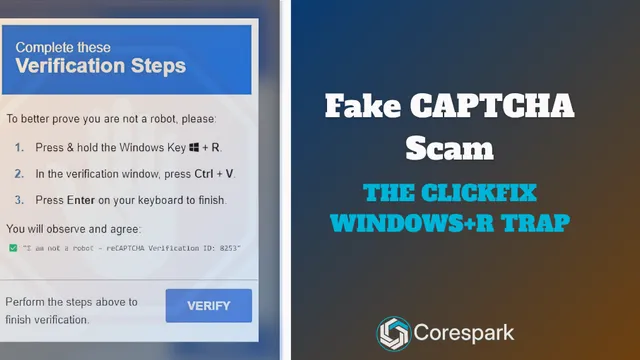
Fake CAPTCHA Scam: The ClickFix Windows+R Trap Explained
Fake CAPTCHA scams may tell you to press Windows+R, paste a command, and run it. Learn the ClickFix warning signs and wh...

Put Your Antique Shop on the Day-Trip Map
Help antique shoppers plan a stop with accurate hours, useful photos, clear categories, directions, and a website that r...